
⚡Data Cloud Deep Dive: How Data 360 Actually Works, Step by Step.
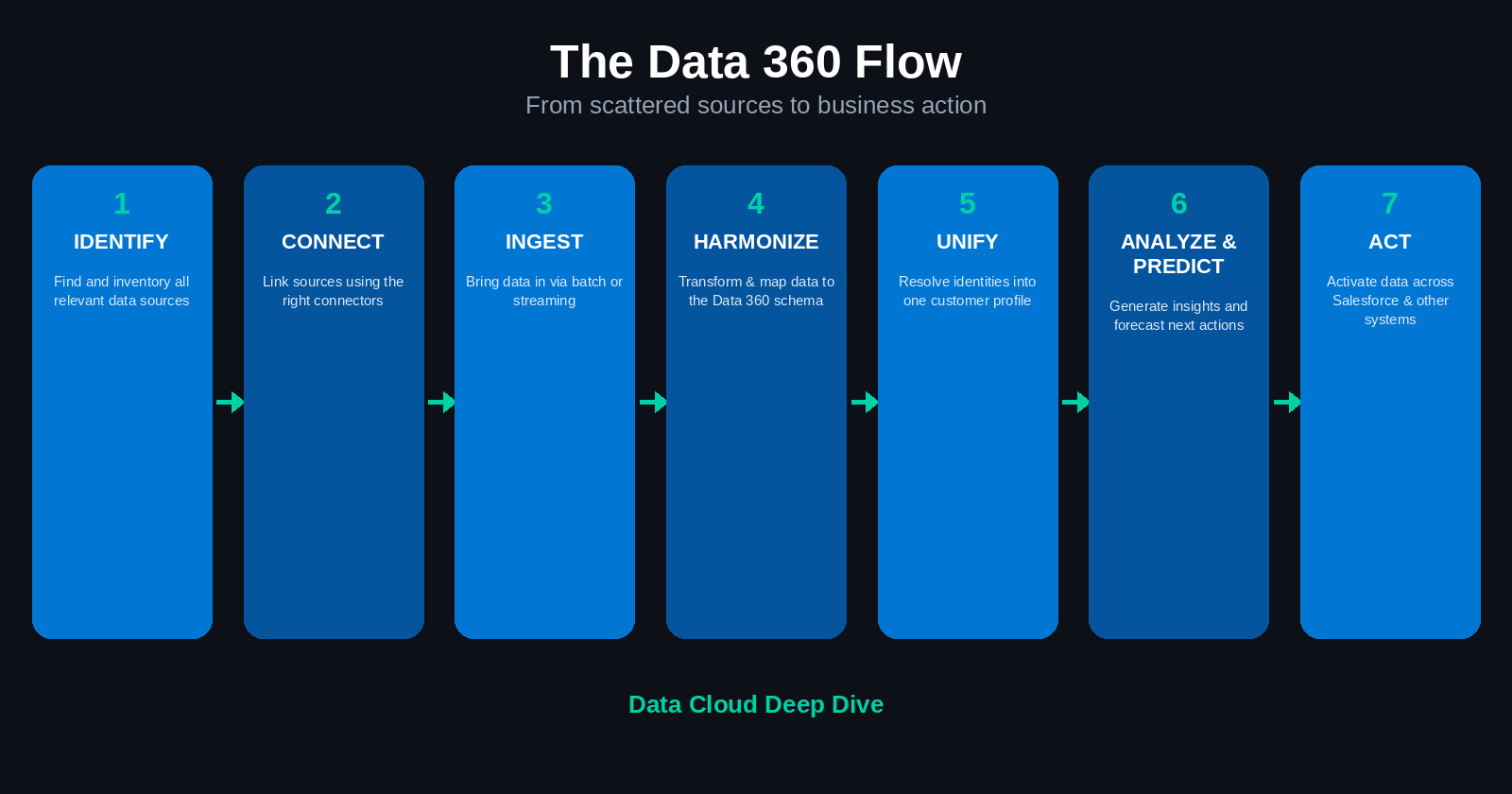
Table of Contents
- The seven-stage flow
- Step 1: Identify data sources
- Step 2: Connect the data sources
- Step 3: Ingest the data — batch vs. streaming
- Step 4: Harmonize the data
- Step 5: Unify the data
- Step 6: Analyze and predict
- Step 7: Act on the data
- The full loop, end to end
- Key takeaways
1. The seven-stage flow
The whole Data 360 process compresses into one line:
Identify → Connect → Ingest → Harmonize → Unify → Analyze and Predict → Act
This isn't unique to Salesforce — it's the same pattern most enterprise data platforms follow: pull data from wherever it lives, process it through batch or near-real-time pipelines, and make it available for analytics, decisions, and activation. What Data Cloud adds is that this entire pipeline runs natively inside Salesforce.
2. Step 1: Identify data sources
Before anything gets connected, you need an honest inventory of where your data actually comes from. For each source, you need to know what data it holds, who owns it, how often it changes, whether it's structured or unstructured, how sensitive or regulated it is, and how it should be connected.
In a typical org, that inventory spans:
- Salesforce sources — Sales Cloud, Service Cloud, Marketing Cloud, Commerce Cloud, other Salesforce orgs
- External storage platforms — AWS, Google Cloud Storage, other cloud storage, data warehouses and data lakes
- External systems — legacy applications, enterprise systems, API-enabled systems, event-driven systems, partner/third-party platforms
- Unstructured sources — documents, emails, PDFs, text files, other content repositories
Skipping this step is how projects end up connecting data blind — pulling in fields nobody fully understands and discovering the gaps months later.
3. Step 2: Connect the data sources
Once sources are identified, they get connected to Data 360 using native Salesforce connectors, cloud-storage connectors, API integrations, data pipelines, event-based integrations, file-based integrations, or custom connectors where nothing else fits.
The connector matters because it defines the pathway data actually travels through — how it's retrieved from the source, ingested into Data 360, refreshed when the source changes, processed against business rules, and made available downstream for analytics or activation. Get the connector wrong and everything after it inherits the problem.
The right connection strategy depends on the source itself: its volume, how often it changes, latency requirements, security needs, and what you're actually trying to do with the data.
4. Step 3: Ingest the data — batch vs. streaming
Ingestion is simply how data moves from the source into Data 360, and there are two ways to do it.
Batch ingestion moves data in groups at scheduled intervals — every few hours, daily, weekly, or on a defined processing window. It's the right call for large volumes, historical loads, periodic reporting, or anything that doesn't need to be current to the second. A typical example: loading yesterday's commerce transactions into Data 360 every night.
Streaming ingestion processes data as events happen, usually through APIs or event-based mechanisms. It fits time-sensitive processes, near-real-time engagement, and event-driven workflows — a case getting created in Service Cloud, an opportunity closing in Sales Cloud, a customer submitting a form or interacting with a campaign.
| Consideration | Batch ingestion | Streaming ingestion |
|---|---|---|
| Timing | Scheduled intervals | As events occur |
| Volume | Well suited for bulk data | Suited for frequent event updates |
| Latency | Higher | Low or near real-time |
| Typical use | Historical loads, periodic reporting | Immediate actions, event-driven processes |
| Main priority | Processing efficiency | Timeliness |
| Example | Daily transaction load | Immediate case or opportunity update |
Decision rule: batch for bulk updates, streaming for anything real-time or time-sensitive.
5. Step 4: Harmonize the data
Harmonization is where raw, messy source data gets forced into a shape Data 360 can actually work with. It has two parts.
Data transformation handles the reality that external data is often denormalized, inconsistent, stored in different formats, named differently across systems, structured differently from the Data 360 schema, missing required fields, or using incompatible date, currency, or status values. Transformation standardizes field formats, converts data types, cleans values, splits or combines fields, normalizes names and addresses, converts source-specific codes, and manages duplicates.
Data mapping then maps that transformed data onto the correct Data 360 schema fields:
| Source-system field | Data 360 field |
|---|---|
| Cust_Email | Email Address |
| ClientName | Individual Name |
| LastPurchaseDt | Purchase Date |
| Svc_Case_No | Service Case Identifier |
This step matters more than it looks. Identity resolution, matching rules, reconciliation, analytics, segmentation, and profile creation all depend on data being aligned to the expected model. If a field is mapped wrong, Data 360 has no reliable way to recognize that two records represent the same person.
6. Step 5: Unify the data
Unification brings together records that belong to the same customer, constituent, account, or entity — across every system they touched.
The same person can genuinely look like three different people on paper: "Samantha" in one system, "Sam" in another, "Sammy" in a third — plus different emails, phone numbers, mailing addresses, spelling variants, customer identifiers, and records created at different times.
Identity resolution is what sorts this out, through a five-step process:
- Identifying potentially related records
- Applying matching rules
- Evaluating the quality of the match
- Resolving conflicting information
- Creating a unified profile
The resulting unified profile combines sales details from Sales Cloud, service interactions from Service Cloud, campaign engagement from Marketing Cloud, purchases from Commerce Cloud, and external behavioral or transactional data — into one coherent picture of that person's profile, behavior, history, preferences, interactions, and relationship with the organization.
7. Step 6: Analyze and predict
Once data is connected, harmonized, and unified, it's finally in shape to generate insight from.
Analysis capabilities include customer behavior analysis, engagement analysis, trend identification, performance dashboards, audience analysis, customer segmentation, and cross-system reporting.
Prediction capabilities include forecasting customer behavior, predicting purchase likelihood, identifying churn risk, recommending next best actions, prioritizing sales or service opportunities, and estimating campaign response.
The point of this step is simple: move from raw data to actionable intelligence, using machine learning, statistical methods, dashboards, and recommendations to support real decisions.
8. Step 7: Act on the data
Data 360 doesn't stop at building profiles or generating insight — the final step is putting it to work. Activation means using Data 360's data or insights to support business processes, inside Salesforce or out.
That can look like: sending enriched customer data back to Marketing Cloud, creating a targeted marketing audience, handing sales reps live customer insight, giving service agents better context, triggering a customer journey, sending data to a third-party platform, storing processed data in cloud storage, supporting research or surveys, or feeding processed data back into Data 360 for further work.
A closed-loop example:
- Marketing engagement data is ingested into Data 360.
- Data 360 identifies which customers interacted with a campaign.
- That engagement data is combined with profile and transaction data.
- The audience is segmented based on behavior.
- The enriched audience is sent back to Marketing Cloud.
- Marketing uses that audience for follow-up targeting.
That's the loop: collect, transform, decide, activate — and often, feed the results back in to start again.
9. The full loop, end to end
Identify sources
      ↓
Connect sources
      ↓
Ingest data
      ↓
Transform and map data
      ↓
Harmonize data
      ↓
Unify customer or constituent records
      ↓
Create unified profiles
      ↓
Analyze and generate predictions
      ↓
Segment and activate data
      ↓
Drive business outcomes
Simplified formula: Scattered data + Data 360 processing = unified, actionable intelligence.
10. Key takeaways
- Everything starts with a real inventory of internal and external data sources.
- Every source needs the right connector — native, cloud-storage, API, event-based, file-based, or custom.
- Batch ingestion suits bulk and scheduled data; streaming suits real-time and event-driven data.
- Harmonization is transformation and mapping — both have to happen for the schema to work.
- Unification only works as well as the mapping and matching rules feeding it.
- A unified profile is the payoff of identity resolution — one consolidated 360-degree view.
- Analysis and prediction are what turn unified data into insight.
- Activation is what turns insight into an actual outcome — the loop isn't complete without it.
Quick knowledge check
- What should be done before connecting data to Data 360?
- What's the difference between batch and streaming ingestion?
- When would streaming be more appropriate than batch?
- What are the two main activities involved in harmonization?
- Why does data mapping matter so much?
- What is identity resolution?
- What is a unified profile?
- How can Data 360 insights be activated?
- What's the difference between analyzing data and acting on it?
- Why is the Data 360 process considered a closed loop?


